Licowa PhotoBooth & Wallpaper – Complete Guide for Android
Introduction
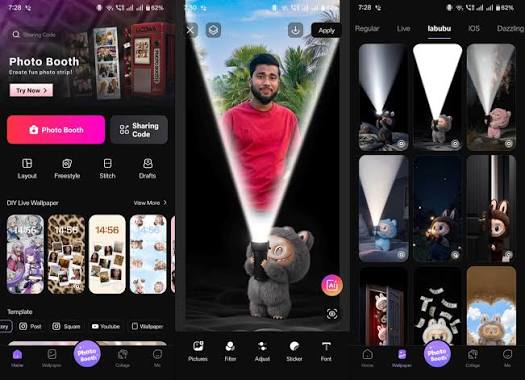
Personalizing your smartphone has become more popular than ever, and wallpaper apps are one of the easiest ways to give your device a fresh new look. Licowa PhotoBooth & Wallpaper is an Android application that combines stylish wallpapers with creative photo booth effects, allowing users to customize both their home screen and lock screen while creating attractive photos with unique filters and frames.
Whether you want aesthetic wallpapers, HD backgrounds, or fun photo effects, Licowa PhotoBooth & Wallpaper offers an easy-to-use platform for enhancing your smartphone experience.
What is Licowa PhotoBooth & Wallpaper?
Licowa PhotoBooth & Wallpaper is an Android customization app that provides a collection of wallpapers, live backgrounds, and photo editing tools. It allows users to browse high-quality wallpapers, apply creative effects to photos, and personalize their device with just a few taps.
The app is suitable for users who enjoy customizing their phones with unique themes, stylish backgrounds, and eye-catching photo effects.
Key Features
1. HD & 4K Wallpapers
The app offers a large collection of wallpapers in HD and 4K quality.
Popular categories include:
- Nature
- Abstract
- Anime
- Cars
- Gaming
- Space
- Minimal
- Dark Wallpapers
- AMOLED Wallpapers
- Cute Wallpapers
2. Live Wallpapers
Users can apply animated wallpapers that make their home screen look more dynamic and attractive.
3. Photo Booth Effects
Licowa includes creative photo booth filters that let users:
- Add stylish frames
- Apply beauty filters
- Use vintage effects
- Create fun selfies
- Add stickers and overlays
4. Easy Wallpaper Application
With one tap, users can set wallpapers for:
- Home Screen
- Lock Screen
- Both Screens
5. Regular Updates
New wallpapers and themes are added frequently, ensuring users always have fresh content.
6. Lightweight Performance
The app is optimized to run smoothly without consuming excessive storage or battery.
Benefits of Using Licowa PhotoBooth & Wallpaper
- Personalize your Android device.
- Access a large wallpaper collection.
- Create stylish photos with creative effects.
- Enjoy high-resolution backgrounds.
- Easy and beginner-friendly interface.
- Regular content updates.
How to Download and Install
Step 1
Open the Google Play Store.
Step 2
Search for Licowa PhotoBooth & Wallpaper.
Step 3
Tap Install.
Step 4
Open the app after installation.
Step 5
Grant the required permissions if prompted.
How to Use
- Launch the app.
- Browse wallpaper categories.
- Select your favorite wallpaper.
- Tap Set Wallpaper.
- Choose Home Screen, Lock Screen, or Both.
For photo editing:
- Open the Photo Booth section.
- Capture or import a photo.
- Apply filters, frames, or effects.
- Save or share your edited image.
Pros
- Large collection of HD wallpapers.
- Simple user interface.
- Creative photo booth filters.
- Lightweight application.
- One-tap wallpaper setting.
- Frequent updates.
Cons
- Some premium content may require payment.
- Internet connection may be needed for downloading wallpapers.
- Advertisements may appear in the free version.
Is Licowa PhotoBooth & Wallpaper Safe?
If downloaded from the Google Play Store or another trusted source, the app is generally safe to use. Always avoid modified APK files from unknown websites, as they may contain malware or unwanted software.
Final Verdict
Licowa PhotoBooth & Wallpaper is a useful Android customization app for users who enjoy personalizing their smartphones with beautiful wallpapers and creative photo effects. Its HD backgrounds, live wallpapers, and easy-to-use editing tools make it a great choice for anyone looking to refresh their device’s appearance.
Conclusion
If you’re searching for an app that combines high-quality wallpapers with fun photo booth features, Licowa PhotoBooth & Wallpaper is worth trying. It offers an enjoyable way to customize your phone and enhance your photos without requiring advanced editing skills.
Introduction
Personalizing your smartphone has become more popular than ever, and wallpaper apps are one of the easiest ways to give your device a fresh new look. Licowa PhotoBooth & Wallpaper is an Android application that combines stylish wallpapers with creative photo booth effects, allowing users to customize both their home screen and lock screen while creating attractive photos with unique filters and frames.
Whether you want aesthetic wallpapers, HD backgrounds, or fun photo effects, Licowa PhotoBooth & Wallpaper offers an easy-to-use platform for enhancing your smartphone experience.
What is Licowa PhotoBooth & Wallpaper?
Licowa PhotoBooth & Wallpaper is an Android customization app that provides a collection of wallpapers, live backgrounds, and photo editing tools. It allows users to browse high-quality wallpapers, apply creative effects to photos, and personalize their device with just a few taps.
The app is suitable for users who enjoy customizing their phones with unique themes, stylish backgrounds, and eye-catching photo effects.
Key Features
1. HD & 4K Wallpapers
The app offers a large collection of wallpapers in HD and 4K quality.
Popular categories include:
- Nature
- Abstract
- Anime
- Cars
- Gaming
- Space
- Minimal
- Dark Wallpapers
- AMOLED Wallpapers
- Cute Wallpapers
2. Live Wallpapers
Users can apply animated wallpapers that make their home screen look more dynamic and attractive.
3. Photo Booth Effects
Licowa includes creative photo booth filters that let users:
- Add stylish frames
- Apply beauty filters
- Use vintage effects
- Create fun selfies
- Add stickers and overlays
4. Easy Wallpaper Application
With one tap, users can set wallpapers for:
- Home Screen
- Lock Screen
- Both Screens
5. Regular Updates
New wallpapers and themes are added frequently, ensuring users always have fresh content.
6. Lightweight Performance
The app is optimized to run smoothly without consuming excessive storage or battery.
Benefits of Using Licowa PhotoBooth & Wallpaper
- Personalize your Android device.
- Access a large wallpaper collection.
- Create stylish photos with creative effects.
- Enjoy high-resolution backgrounds.
- Easy and beginner-friendly interface.
- Regular content updates.
How to Download and Install
Step 1
Open the Google Play Store.
Step 2
Search for Licowa PhotoBooth & Wallpaper.
Step 3
Tap Install.
Step 4
Open the app after installation.
Step 5
Grant the required permissions if prompted.
How to Use
- Launch the app.
- Browse wallpaper categories.
- Select your favorite wallpaper.
- Tap Set Wallpaper.
- Choose Home Screen, Lock Screen, or Both.
For photo editing:
- Open the Photo Booth section.
- Capture or import a photo.
- Apply filters, frames, or effects.
- Save or share your edited image.
Pros
- Large collection of HD wallpapers.
- Simple user interface.
- Creative photo booth filters.
- Lightweight application.
- One-tap wallpaper setting.
- Frequent updates.
Cons
- Some premium content may require payment.
- Internet connection may be needed for downloading wallpapers.
- Advertisements may appear in the free version.
Is Licowa PhotoBooth & Wallpaper Safe?
If downloaded from the Google Play Store or another trusted source, the app is generally safe to use. Always avoid modified APK files from unknown websites, as they may contain malware or unwanted software.
Final Verdict
Licowa PhotoBooth & Wallpaper is a useful Android customization app for users who enjoy personalizing their smartphones with beautiful wallpapers and creative photo effects. Its HD backgrounds, live wallpapers, and easy-to-use editing tools make it a great choice for anyone looking to refresh their device’s appearance.
Conclusion
If you’re searching for an app that combines high-quality wallpapers with fun photo booth features, Licowa PhotoBooth & Wallpaper is worth trying. It offers an enjoyable way to customize your phone and enhance your photos without requiring advanced editing skills.