MobileTrans Data Transfer – The Complete Guide to Fast Phone-to-Phone Data Migration
Introduction
Upgrading to a new smartphone is exciting, but transferring all your important data can feel overwhelming. Photos, videos, contacts, messages, apps, and documents are valuable, and losing them during the transfer process is something nobody wants. Fortunately, MobileTrans Data Transfer makes switching to a new device simple, fast, and secure.
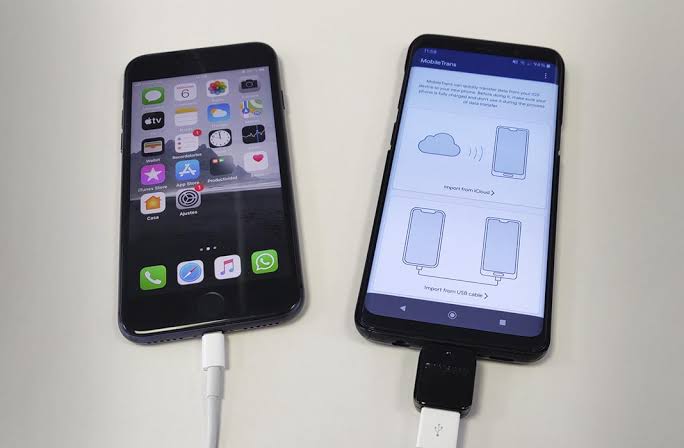
MobileTrans is a popular phone transfer application that allows users to move data between Android and iPhone devices with just a few taps. Whether you’re changing brands, upgrading your phone, or backing up important files, MobileTrans provides an easy solution.
What is MobileTrans Data Transfer?
MobileTrans Data Transfer is a mobile data migration app that helps users transfer files from one smartphone to another without complicated setup. It supports transferring:
- Contacts
- Photos
- Videos
- Music
- Documents
- SMS Messages
- Call Logs
- Calendar
- Apps (supported devices)
- WhatsApp Data (selected versions)
The app is designed for users who want a quick and reliable way to move their personal data while keeping everything organized.
Key Features of MobileTrans
1. Phone-to-Phone Transfer
Transfer your data directly between two smartphones without manually copying files.
2. Cross-Platform Support
MobileTrans supports transfers between:
- Android to Android
- Android to iPhone
- iPhone to Android
- iPhone to iPhone
This makes it useful even when switching to a different mobile operating system.
3. High-Speed Transfer
The app uses Wi-Fi Direct or local connections to transfer files quickly without consuming mobile data.
4. Multiple File Types
Move almost everything from your old phone, including media files, contacts, and important documents.
5. Secure Data Migration
Data is transferred directly between devices without being publicly shared, helping keep your information private.
6. Simple User Interface
The app provides an easy step-by-step process, making it suitable even for beginners.
How MobileTrans Works
The transfer process is simple:
- Install MobileTrans on both phones.
- Open the app on each device.
- Select the old phone as the sender.
- Select the new phone as the receiver.
- Connect both devices.
- Choose the files you want to transfer.
- Tap Start Transfer.
- Wait until the process is complete.
Depending on the amount of data, the transfer may take a few minutes.
Benefits of Using MobileTrans
Saves Time
Instead of manually copying files, everything is transferred automatically.
Keeps Your Data Organized
Contacts, photos, and documents remain properly arranged after transfer.
No Internet Required
Many transfers use a direct device connection, so mobile data isn’t needed.
Supports Large Files
Transfer thousands of photos, long videos, and large documents without difficulty.
Beginner-Friendly
No technical knowledge is required.
Supported Data Types
MobileTrans can transfer:
- Contacts
- SMS
- Photos
- Videos
- Audio Files
- Documents
- PDFs
- Calendar Events
- Notes (supported devices)
- Wallpapers
- Apps (device dependent)
How to Download MobileTrans
- Open the Google Play Store.
- Search for MobileTrans – Data Transfer.
- Select the official app.
- Tap Install.
- Open the app and grant the required permissions.
How to Use MobileTrans
Step 1
Install the application on both smartphones.
Step 2
Launch the app.
Step 3
Choose whether the phone is the Old Device or New Device.
Step 4
Connect both phones.
Step 5
Select the data you wish to transfer.
Step 6
Tap Transfer and wait until the process finishes.
Advantages
- Fast transfer speeds
- Easy to use
- Supports Android and iPhone
- Transfers multiple file types
- Secure local transfer
- No USB cable required (for supported methods)
- Beginner-friendly interface
Disadvantages
- Some advanced features may require a premium version.
- Transfer speed depends on device performance.
- Certain app data may not transfer due to operating system limitations.
- Some features vary by Android or iOS version.
Tips for Faster Transfers
- Charge both phones above 50%.
- Keep both devices close together.
- Close unnecessary background apps.
- Use a stable Wi-Fi Direct connection.
- Avoid interrupting the transfer process.
Common Problems and Solutions
Transfer Stuck
Restart both devices and reconnect.
Connection Failed
Ensure Wi-Fi and required permissions are enabled.
Slow Speed
Move closer together and close other running applications.
Missing Files
Update MobileTrans and retry the transfer.
Who Should Use MobileTrans?
MobileTrans is ideal for:
- Students
- Professionals
- Content Creators
- Business Users
- Families
- Anyone switching to a new smartphone
Safety and Privacy
To keep your data secure:
- Download MobileTrans only from the Google Play Store or the developer’s official website.
- Grant only the permissions necessary for transferring data.
- Keep the app updated to the latest version.
- Avoid downloading modified APK files from unknown websites.
Conclusion
MobileTrans Data Transfer is one of the easiest and most reliable tools for moving data between smartphones. Its fast transfer speed, simple interface, support for multiple file types, and cross-platform compatibility make it an excellent choice for anyone upgrading to a new phone.
Whether you’re moving from Android to Android, Android to iPhone, or vice versa, MobileTrans helps transfer your important files safely and efficiently, allowing you to start using your new device with minimal hassle.