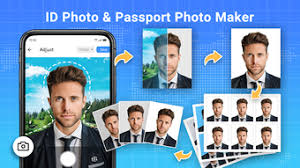
In today’s digital world, official documents such as passports, visas, national ID cards, driving licenses, student IDs, job applications, and online government services often require a properly formatted passport-size photo. Visiting a professional photo studio every time you need an ID photo can be expensive and time-consuming. Fortunately, Passport Photo: ID Photo Maker apps for Android provide a simple and affordable solution by allowing users to create professional passport and ID photos directly from their smartphones.
A Passport Photo: ID Photo Maker app uses your phone’s camera to capture high-quality images, automatically remove or replace backgrounds, crop photos according to official document sizes, and prepare them for printing or digital submission. Whether you are applying for a passport, visa, school admission, driver’s license, or online verification, these apps help you create compliant ID photos in just a few minutes.
This guide explains everything about Passport Photo: ID Photo Maker, including its features, benefits, how it works, supported photo sizes, editing tools, printing options, privacy considerations, and why it has become one of the most useful productivity apps for Android users.
What is Passport Photo: ID Photo Maker?
Passport Photo: ID Photo Maker is an Android application designed to create passport-size and official identification photos using your smartphone. Instead of relying on expensive photography studios, users can take a picture at home and edit it according to official standards.
The app provides tools for:
- Passport photo creation
- Visa photo preparation
- ID card photo editing
- Background removal
- Automatic face alignment
- Photo resizing
- Print layout generation
- Digital export
Many apps also include templates for different countries, making it easier to meet government photo requirements.
Why Use a Passport Photo Maker App?
Traditional passport photography can cost both time and money. With an ID Photo Maker app, users can create professional-quality images whenever needed.
Key advantages include:
- Save money on studio photography
- Create photos anytime at home
- Multiple country templates
- Easy editing tools
- Instant digital download
- Print-ready layouts
- Quick background replacement
- High-resolution image output
These benefits make the app especially useful for students, travelers, professionals, and families.
Main Features of Passport Photo: ID Photo Maker
1. Automatic Passport Photo Creation
The app guides users through taking a properly aligned photo. It automatically detects the face, adjusts positioning, and prepares the image according to official standards.
This reduces errors and improves the chances of photo acceptance.
2. AI Background Removal
One of the most popular features is automatic background removal.
Instead of standing in front of a white wall, users can take a normal photo and let the app remove the background using AI technology.
The background can then be replaced with:
- White
- Blue
- Gray
- Light cream
- Other solid colors (depending on country requirements)
3. Country-Specific Passport Sizes
Different countries require different passport photo dimensions.
Many Passport Photo Maker apps include templates for:
- Pakistan Passport
- India Passport
- USA Passport
- UK Passport
- Canada Passport
- Australia Passport
- UAE Visa
- Saudi Visa
- Schengen Visa
- European Union ID Cards
Users simply select their country, and the app automatically applies the correct size and formatting.
4. Automatic Face Detection
The app uses facial recognition technology to:
- Detect eyes
- Center the face
- Adjust head position
- Ensure proper spacing
- Align facial proportions
This helps meet official passport and visa photo requirements.
5. Photo Editing Tools
Users can improve image quality using built-in editing features such as:
- Brightness adjustment
- Contrast control
- Saturation
- Sharpness
- Crop tool
- Rotation
- Color correction
- Exposure adjustment
These tools help create clear, professional-looking photos.
6. Print Layout Generator
Instead of printing a single image, the app arranges multiple passport-size photos on one sheet.
Common layouts include:
- 4 photos
- 6 photos
- 8 photos
- 12 photos
This saves paper and reduces printing costs.
7. Digital Photo Export
Many online applications require digital passport photos.
The app allows users to export photos in high-resolution JPEG or PNG formats, making them suitable for:
- Online passport applications
- Visa portals
- Government forms
- Job applications
- School admissions
- Online identity verification
8. High-Resolution Output
The app preserves image quality by exporting high-resolution files suitable for both digital submission and professional printing.
This ensures that facial details remain clear and meet official requirements.
9. Easy Sharing
Finished photos can be shared directly through:
- Google Drive
- Cloud storage
- Bluetooth
- Nearby Share
This makes it convenient to send photos to employers, schools, or government agencies.
10. User-Friendly Interface
Most Passport Photo Maker apps are designed for beginners.
Simple navigation, clear instructions, and automatic editing allow users with no photography experience to create professional passport photos quickly.
Common Uses of Passport Photo: ID Photo Maker
The app is useful for creating photos for:
- Passports
- National ID Cards
- Driver’s Licenses
- Student ID Cards
- Employee ID Cards
- Visa Applications
- Immigration Documents
- Online Government Portals
- Job Applications
- Exam Registration Forms
- Banking Verification
- Travel Documents
Benefits of Using Passport Photo Maker
Using a Passport Photo: ID Photo Maker app offers several benefits:
- Saves money on photo studio visits.
- Create passport photos anytime.
- Fast and convenient editing.
- AI-powered background removal.
- Country-specific templates.
- Professional print layouts.
- High-quality digital exports.
- Suitable for multiple official documents.
- Easy to use for beginners.
- Quick sharing and printing options.
Tips for Taking a Good Passport Photo
For the best results:
- Use bright, even lighting.
- Look directly at the camera.
- Maintain a neutral facial expression unless official guidelines state otherwise.
- Avoid hats or sunglasses unless permitted for medical or religious reasons.
- Wear plain clothing that contrasts with the background.
- Keep the camera steady to avoid blurry images.
- Review the final photo before printing or submitting it.
Privacy and Security
Passport photos are personal information, so it’s important to protect your data.
When using an ID Photo Maker app:
- Download it from trusted sources like the Google Play Store.
- Review the permissions it requests.
- Avoid sharing passport photos on public platforms.
- Delete unnecessary copies from your device after use if they’re no longer needed.
- Check the app’s privacy policy if you’re uploading photos to cloud services.
Conclusion
Passport Photo: ID Photo Maker is a practical Android app that makes creating professional passport and ID photos simple, fast, and affordable. With features like AI background removal, automatic face detection, country-specific photo templates, built-in editing tools, high-resolution exports, and print-ready layouts, it eliminates the need for frequent visits to a photo studio.
Whether you need a passport photo for travel, a visa application, a national ID, a driver’s license, school admission, or an online verification process, this app provides a convenient solution from your smartphone. By following official photo guidelines and using the app’s built-in tools, users can prepare high-quality ID photos suitable for both digital submissions and printed documents.