Batix Charging Photo App – Complete Guide to Battery Charging Animation & Charging Photos
Introduction
In today’s smartphone era, customization has become one of the biggest trends among Android users. People no longer want a simple charging screen—they want stylish battery animations, beautiful charging photos, and eye-catching effects that make charging their phones more enjoyable. This is where the Batix Charging Photo App comes in.
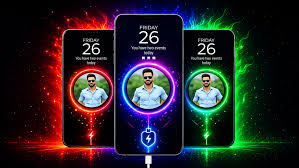
Batix Charging Photo is an Android customization application that allows users to personalize their phone’s charging screen with HD photos, animated charging effects, battery information, and unique charging themes. Instead of seeing a plain battery icon while charging, users can display their favorite photos, stylish animations, and colorful battery effects.
Whether you are looking to personalize your smartphone, impress your friends, or simply make your charging screen more attractive, Batix Charging Photo offers an easy and creative solution.
In this complete guide, you’ll learn everything about the Batix Charging Photo App, including its features, benefits, installation process, customization options, advantages, disadvantages, and tips for getting the best experience.
What is Batix Charging Photo App?
Batix Charging Photo App is a battery charging customization application designed for Android devices. It automatically displays a personalized charging screen whenever the charger is connected.
The app allows users to:
- Set custom charging photos
- Display battery charging animations
- Show battery percentage
- View charging status
- Add colorful charging effects
- Customize charging themes
Instead of the default Android charging screen, Batix creates a modern and visually appealing charging experience.
Key Features of Batix Charging Photo App
HD Charging Photos
Users can choose their favorite images from the phone gallery and display them while charging.
The app supports:
- Family photos
- Personal pictures
- Nature wallpapers
- Anime wallpapers
- Car wallpapers
- Love backgrounds
- 4K wallpapers
Every time the charger is connected, the selected image appears automatically.
Battery Charging Animation
Batix includes dozens of beautiful charging animations.
Popular animations include:
- Neon charging effects
- Lightning animations
- Energy waves
- Electric charging circles
- RGB battery effects
- Glowing battery rings
These animations make charging much more enjoyable.
Battery Percentage Display
The application displays real-time battery information such as:
- Battery percentage
- Charging speed
- Charging status
- Battery health
- Charging progress
Users can easily monitor battery charging without unlocking the phone.
Custom Charging Themes
Batix offers multiple charging themes including:
- Dark themes
- AMOLED themes
- Colorful themes
- Gaming themes
- Minimal themes
- Premium HD themes
You can switch themes anytime.
Charging Sound Effects
Users can enable charging sounds when plugging in the charger.
Examples include:
- Electric sounds
- Beep sounds
- Notification sounds
- Custom sounds
These sounds make the charging experience even more interactive.
Battery Health Monitoring
The app also displays useful battery information like:
- Battery temperature
- Battery voltage
- Charging current
- Battery capacity
These details help users monitor battery performance.
How Batix Charging Photo App Works
The application detects when your charger is connected.
Once charging begins:
- The charging screen opens automatically.
- The selected charging photo appears.
- Battery animation starts.
- Battery percentage updates in real time.
- Charging information is displayed.
- Animation stops after disconnecting the charger.
Everything works automatically without manual setup after initial configuration.
Benefits of Using Batix Charging Photo
Personalized Charging Screen
Instead of the standard charging screen, users can display their favorite memories and wallpapers.
Better User Experience
Animated charging effects make your phone look modern and premium.
Battery Monitoring
Users can monitor battery level and charging progress easily.
Stylish Phone Customization
Batix gives your Android phone a unique and attractive appearance.
Easy to Use
The interface is beginner-friendly and requires no technical knowledge.
How to Download Batix Charging Photo App
Installing Batix Charging Photo is simple.
Step 1
Open Google Play Store.
Step 2
Search for Batix Charging Photo.
Step 3
Tap Install.
Step 4
Wait until installation finishes.
Step 5
Open the application.
Step 6
Grant required permissions.
Step 7
Choose your favorite charging animation and photo.
Your charging screen is now customized.
How to Set Charging Photo
Setting a charging photo only takes a few steps.
- Open Batix Charging Photo.
- Tap “Charging Photo.”
- Select an image from Gallery.
- Adjust the crop.
- Save settings.
- Connect the charger.
Your selected image will now appear automatically.
How to Change Charging Animation
Users can also customize charging animations.
Steps:
- Open Animations.
- Browse available effects.
- Preview the animation.
- Tap Apply.
- Connect the charger to test it.
Customization Options
Batix offers extensive customization.
Users can modify:
- Animation speed
- Charging colors
- Battery icon style
- Screen brightness
- Clock display
- Battery percentage position
- Animation size
- Background image
This allows users to create a fully personalized charging screen.
Battery Information Available
The application displays:
- Battery Level
- Battery Temperature
- Battery Voltage
- Charging Status
- Battery Health
- Charging Speed
- Battery Capacity
This information helps users maintain battery health.
Why Users Love Batix Charging Photo
Millions of Android users enjoy Batix because it provides:
- Beautiful charging effects
- HD charging wallpapers
- Easy customization
- Lightweight performance
- Attractive interface
- Fast setup
It transforms an ordinary charging screen into something visually impressive.
Tips for Better Battery Health
While using Batix Charging Photo, follow these battery tips:
- Use the original charger.
- Avoid charging in high temperatures.
- Don’t overheat the phone while gaming.
- Remove heavy phone cases if overheating occurs.
- Keep software updated.
- Avoid using damaged charging cables.
These habits help extend battery lifespan.
Advantages of Batix Charging Photo
- Easy installation
- Beautiful charging animations
- HD charging photos
- Battery monitoring
- Stylish themes
- Lightweight application
- User-friendly interface
- Low battery consumption
- Fast performance
- Regular updates
Disadvantages
- Some premium themes require payment.
- Ads may appear in the free version.
- Certain animations may not support older Android devices.
- Some features depend on device compatibility.
Who Should Use Batix Charging Photo?
The app is suitable for:
- Android users
- Students
- Gamers
- Content creators
- Social media influencers
- Mobile customization lovers
- Technology enthusiasts
Anyone who enjoys personalizing their smartphone can benefit from Batix.
Safety and Privacy
Always download the app from trusted sources.
Recommended safety tips:
- Install from Google Play Store whenever possible.
- Grant only necessary permissions.
- Keep the app updated.
- Avoid downloading modified APK versions from unknown websites.
Frequently Asked Questions
Is Batix Charging Photo free?
Yes. The basic version is free, although premium features may require in-app purchases.
Does it drain battery?
No. It is optimized for minimal battery consumption, though animations may use a small amount of extra power while charging.
Can I use my own photo?
Yes. You can choose any image from your gallery.
Does it work on all Android phones?
It works on most Android devices running supported Android versions.
Is it safe?
Yes, if downloaded from a trusted source such as the Google Play Store.
Conclusion
Batix Charging Photo App is an excellent Android customization tool that transforms the ordinary charging screen into a beautiful and interactive experience. With HD charging photos, stylish battery animations, charging themes, battery monitoring, and an easy-to-use interface, it offers everything users need to personalize their smartphones.
Whether you’re a student, gamer, content creator, or someone who simply loves smartphone customization, Batix Charging Photo is worth trying. By combining attractive visuals with useful battery information, it makes charging your phone more enjoyable while helping you monitor your battery’s status.
Download
Download the latest version of Batix Charging Photo App and give your Android phone a fresh, stylish charging experience with beautiful animations, custom photos, and real-time battery information.